
はじめに
意味がわからない英単語に遭遇した場合、Weblio 英和辞典を使って意味を調べた経験がある人は多いと思います。 私も普段の英語学習において Weblio 英和辞典で単語を調べて、自分のノートにメモするという作業をしていましたが、今回 Python と Notion API を利用してこの作業を自動化したのでその手順をまとめたいと思います。
環境
以下が今回の環境です。※beautifulsoup4、notion-client は後ほど説明する手順の中でインストールします。
$ python -V
Python 3.7.10
$ pip -V
pip 20.2.2 from /usr/lib/python3.7/site-packages/pip (python 3.7)
$ pip list | grep beautifulsoup4
beautifulsoup4 4.10.0
$ pip list | grep notion-client
notion-client 0.8.0
$ pip list | grep requests
requests 2.25.1
対象者
この記事は下記のような人を対象にしています。
- スクレイピングで英単語の意味を取得したい人
- 検索した結果を Notion にまとめたい人
手順
beautifulsoup4、notion-client をインストールする
下記コマンドを実行して beautifulsoup4、notion-client をインストールします。
$ pip install beautifulsoup4
$ pip install notion-client
Notion API の設定を行う
公式ドキュメントを参考に、Notion API の設定の設定を行います。 Internal Integration Token は Notion API を叩く際に必要になるので、セキュアに保管してください。
データベース情報を取得する
Notion API を使用してデータベースにレコードを作成するために、登録するデータベースの ID が必要です。 データベースの ID は Notion の URL から確認可能です。
https://www.notion.so/myworkspace/a8aec43384f447ed84390e8e42c2e089?v=...
 |--------- Database ID --------|
プログラムを実行する
下記のプログラムを登録に使用しました。
- Weblio英和辞典の URL が “https://ejje.weblio.jp/content/brainteaser/{検索語}“になっていることを利用してリクエスト
- Weblio英和辞典へのリクエストのレスポンスから発音、意味を取得し、またWeblio英和辞典の URL もあわせて Notion に登録
import logging
import sys

from bs4 import BeautifulSoup
from notion_client import Client
import requests

notion_token = {Internal Integration Token}
database_id = {データベースの ID}

notion = Client(auth=notion_token)
url='https://ejje.weblio.jp/content/'

def search_weblio(word):
 response = requests.get(url+word)
 soup = BeautifulSoup(response.text, 'html.parser')
 return soup

def parse_item(word):
 soup = search_weblio(word)
 pronunciation = soup.find(class_='phoneticEjjeDesc').get_text() if soup.find(class_='phoneticEjjeDesc') else ''
 japanese = soup.find(class_='content-explanation ej').get_text().strip()

 properties = {
 'Word': {
 'title': [{
 'text': {
 'content': word
 }
 }]
 },
 'Pronunciation': {
 'rich_text': [{
 'text': {
 'content': pronunciation
 }
 }]
 },
 'Japanese': {
 'rich_text': [{
 'text': {
 'content': japanese
 }
 }]
 },
 'Weblio': {
 'url': url+word
 },
 }
 return properties

def create_item(word):
 properties=parse_item(word)
 r = notion.pages.create(
 **{
 'parent': {'database_id' : database_id},
 'properties': properties
 }
 )
 print(r)

if __name__ == '__main__':
 create_item(sys.argv[1])
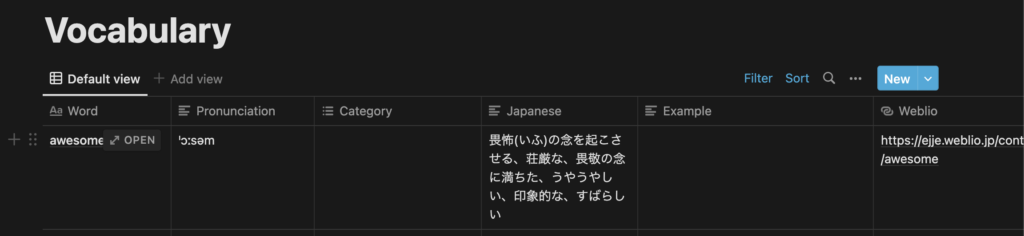
プログラムを実行します。今回は awesome を登録します。
$ python create_item.py awesome
Notion に登録されていることが確認できました。
おわりに
今回は Python と Notion API を利用して、英単語を検索して意味をノートにメモする作業を自動化しました。英語学習にお役立てください。この記事がどなたかの参考になれば幸いです。