はじめに
Git を用いて開発する中で、git tag でコミットにタグを付与することがあると思います。本記事では、Git のコミットに付与したタグを Docker イメージにも付与することでコードと Docker イメージの関連性が分かるように、AWS CodeBuild を構築したいと思います。
対象者
この記事は下記のような人を対象にしています。
- Git のコミットに付与したタグを Docker イメージにも付与したい人
- CodeBuild を使用して Docker イメージをビルドしたい人
手順
CodeCommit リポジトリ、CodeBuild プロジェクトの作成
ソースプロバイダには CodeCommit を使用しました。 以下の AWS CloudFormation(以降Cfn) テンプレートを使用して作成しました。
AWSTemplateFormatVersion: "2010-09-09"

Description: Template generated by rain

Parameters:
 CommonNameParameter:
 Type: String

Resources:
 MyRepository:
 Type: AWS::CodeCommit::Repository
 Properties:
 RepositoryDescription: repository for my codes
 RepositoryName: !Ref CommonNameParameter

Outputs:
 MyRepositoryArn:
 Value: !GetAtt MyRepository.Arn

 MyRepositoryCloneUrlHttp:
 Value: !GetAtt MyRepository.CloneUrlHttp
 Export:
 Name: !Sub ${CommonNameParameter}RepositoryCloneUrlHttp

 MyRepositoryName:
 Value: !GetAtt MyRepository.Name
 Export:
 Name: !Sub ${CommonNameParameter}RepositoryName
CodeBuild プロジェクトの作成には以下の Cfn テンプレートを使用しました。
今回は Docker イメージのビルドを行うため PrivilegedMode: trueに設定しています。(AWS::CodeBuild::Project Environment - AWS CloudFormation)
AWSTemplateFormatVersion: "2010-09-09"

Description: Template generated by rain

Parameters:
 CommonNameParameter:
 Type: String

Resources:
 MyPolicy:
 Type: AWS::IAM::ManagedPolicy
 Properties:
 Path: /
 ManagedPolicyName: !Sub ${CommonNameParameter}_codebuild_policy
 PolicyDocument:
 Version: "2012-10-17"
 Statement:
 Effect: Allow
 Action:
 - "logs:CreateLogGroup"
 - "logs:CreateLogStream"
 - "logs:PutLogEvents"
 - "s3:PutObject"
 - "s3:GetObject"
 - "s3:GetObjectVersion"
 - "s3:GetBucketAcl"
 - "s3:GetBucketLocation"
 - "codecommit:GitPull"
 - "codebuild:CreateReportGroup"
 - "codebuild:CreateReport"
 - "codebuild:UpdateReport"
 - "codebuild:BatchPutTestCases"
 - "codebuild:BatchPutCodeCoverages"
 Resource: "*"
 MyRole:
 Type: AWS::IAM::Role
 Properties:
 AssumeRolePolicyDocument:
 Version: "2012-10-17"
 Statement:
 - Effect: Allow
 Principal:
 Service:
 - codebuild.amazonaws.com
 Action:
 - sts:AssumeRole
 ManagedPolicyArns:
 - arn:aws:iam::aws:policy/AWSLambda_FullAccess
 - arn:aws:iam::aws:policy/AmazonEC2ContainerRegistryPowerUser
 - !Ref MyPolicy
 RoleName: !Sub ${CommonNameParameter}_codebuild_role

 MyProject:
 Type: AWS::CodeBuild::Project
 Properties:
 Artifacts:
 EncryptionDisabled: false
 Location: !ImportValue CodeBuildOutputBucketName
 Name: !Sub CommonNameParameter
 NamespaceType: NONE
 OverrideArtifactName: false
 Packaging: NONE
 Path: ""
 Type: S3
 BadgeEnabled: false
 Cache:
 Type: NO_CACHE
 ConcurrentBuildLimit: 1
 EncryptionKey: !Sub arn:aws:kms:${AWS::Region}:${AWS::AccountId}:alias/aws/s3
 Environment:
 ComputeType: BUILD_GENERAL1_SMALL
 EnvironmentVariables:
 - Name: REPOSITORY_NAME
 Type: PLAINTEXT
 Value: !Sub ${CommonNameParameter}
 Image: aws/codebuild/amazonlinux2-x86_64-standard:3.0-21.04.23
 ImagePullCredentialsType: CODEBUILD
 PrivilegedMode: true
 Type: LINUX_CONTAINER
 LogsConfig:
 CloudWatchLogs:
 Status: ENABLED
 S3Logs:
 EncryptionDisabled: false
 Status: DISABLED
 Name: !Sub ${CommonNameParameter}
 QueuedTimeoutInMinutes: 480
 ServiceRole: !GetAtt MyRole.Arn
 Source:
 GitCloneDepth: 1
 GitSubmodulesConfig:
 FetchSubmodules: false
 InsecureSsl: false
 Location:
 !ImportValue
 Fn::Sub: ${CommonNameParameter}RepositoryCloneUrlHttp
 Type: CODECOMMIT
 TimeoutInMinutes: 60

Outputs:
 MyProjectArn:
 Value: !GetAtt MyProject.Arn
 MyProjectName:
 Value: !Ref MyProject
 Export:
 Name: !Sub ${CommonNameParameter}ProjectName
buildspec.yml の作成
下記の buildspec.yml を CodeCommit リポジトリに Dockerfile とともに保存します。
git describe --tagsでタグを取得し、docker tagで取得したタグ名でタグを付与しています- 今回は CodeBuild プロジェクトの環境変数に REPOSITORY_NAME = sample を設定しています
version: 0.2

phases:
 pre_build:
 commands:
 - $(aws ecr get-login --region ${AWS_DEFAULT_REGION} --no-include-email)
 - AWS_ACCOUNT_ID=$(aws sts get-caller-identity --query 'Account' --output text)
 - REPOSITORY_URI=${AWS_ACCOUNT_ID}.dkr.ecr.${AWS_DEFAULT_REGION}.amazonaws.com/${REPOSITORY_NAME}
 - IMAGE_TAG=$(git describe --tags)
 - echo ${IMAGE_TAG}
 build:
 commands:
 - docker build -t sample .
 - docker tag ${REPOSITORY_NAME}:latest ${REPOSITORY_URI}:latest
 - docker tag ${REPOSITORY_NAME}:latest ${REPOSITORY_URI}:${IMAGE_TAG}
 post_build:
 commands:
 - docker push ${REPOSITORY_URI}:${IMAGE_TAG}
 - docker push ${REPOSITORY_URI}:latest
コミット
コミットにgit tagでタグを付与し、CodeCommit リポジトリにプッシュします。
$ git add .
$ git commit -m "test commit"
$ git tag v1.0
$ git push origin v1.0
$ git push
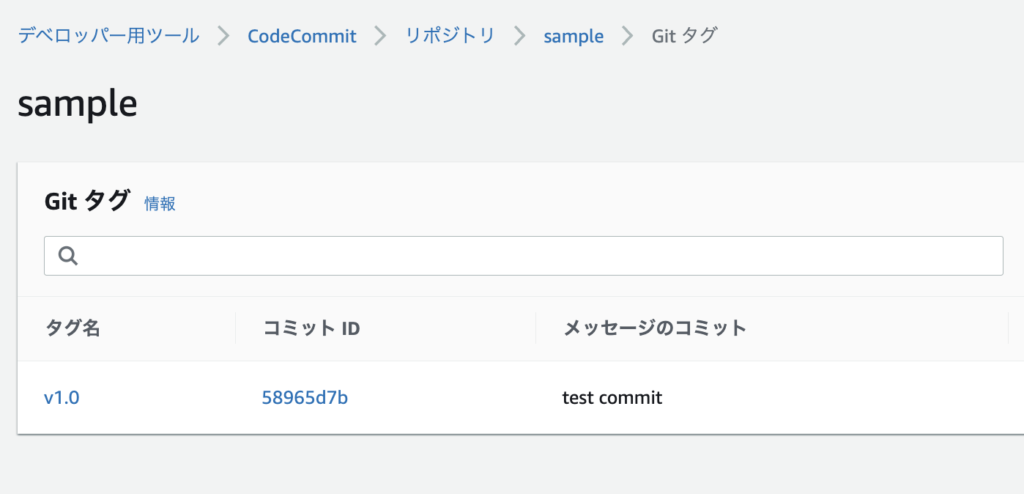
CodeCommit のコンソール画面から、コミットにタグが付与されていることが確認できます。
ビルドの実行
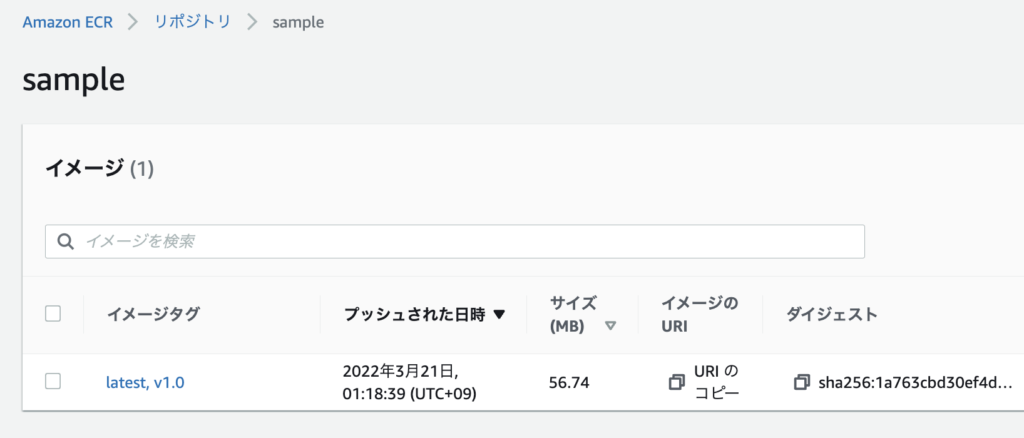
Codebuild でビルドを実行すると、コミットに付与されたタグが Docker イメージにも付与できていることが確認できます。
おわりに
本記事では、AWS CodeBuild を用いて Git のコミットに付与したタグを Docker イメージにも付与しました。この記事がどなたかの参考になれば幸いです。